|
|
# ServerStatus-V
|
|
|
|
|
|
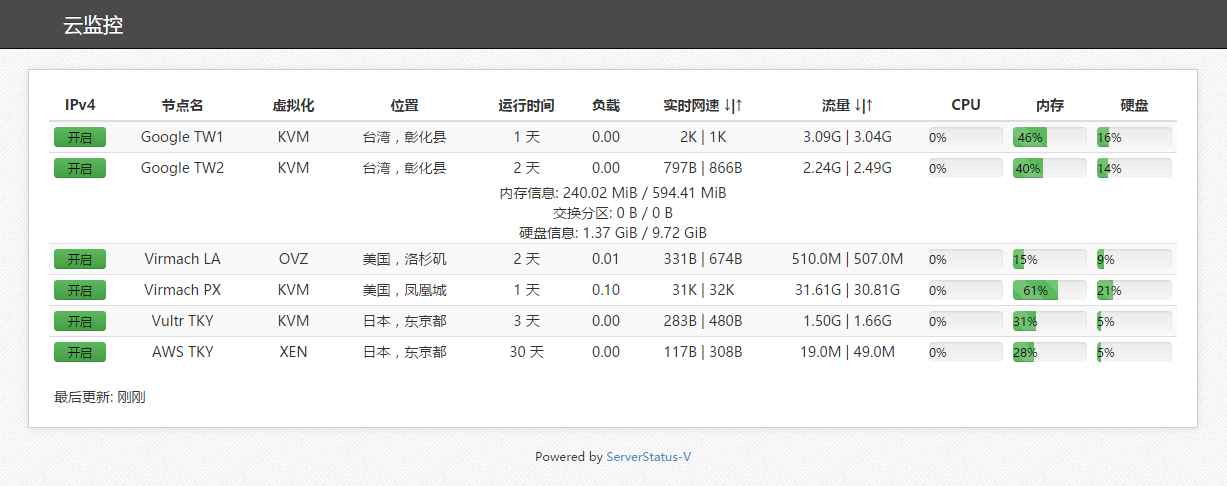
[ServerStatus-V](https://github.com/P3TERX/ServerStatus-V) 是一个酷炫高逼格的云探针、云监控、服务器云监控、多服务器探针。使用方便,信息直观。ServerStatus-V 是 [ServerStatus 中文版](https://github.com/tenyue/ServerStatus) 项目的优化/修改版。
|
|
|
|
|
|
ServerStatus-V 通过 vnStat 获取月流量数据,如未安装流量数据不会显示。[vnStat 安装教程](https://p3terx.com/archives/statistics-vps-traffic-using-vnstat-under-linux.html)
|
|
|
|
|
|
|
|
|
|
|
|
# 目录介绍
|
|
|
|
|
|
* `clients` 客户端文件
|
|
|
* `server` 服务端文件
|
|
|
* `web` 网站文件
|
|
|
* `init.d` 服务脚本
|
|
|
|
|
|
# 安装教程
|
|
|
|
|
|
执行下面的代码下载并运行脚本,如果脚本有更新,也可使用下面的命令来更新。
|
|
|
```
|
|
|
wget -N --no-check-certificate https://raw.githubusercontent.com/P3TERX/ServerStatus-V/master/status.sh && chmod +x status.sh && bash status.sh
|
|
|
```
|
|
|
下载脚本后,根据需要安装客户端或者服务端:
|
|
|
```
|
|
|
# 客户端菜单
|
|
|
bash status.sh c
|
|
|
|
|
|
# 服务端菜单
|
|
|
bash status.sh s
|
|
|
```
|
|
|
运行脚本后会出现脚本操作菜单,选择并输入` 1 `就会开始安装。
|
|
|
|
|
|
## 简单步骤
|
|
|
|
|
|
首先安装服务端,安装过程中会提示:
|
|
|
|
|
|
```
|
|
|
是否由脚本自动配置HTTP服务(服务端的在线监控网站)[Y/n]
|
|
|
|
|
|
# 如果你不懂,那就直接回车,如果你想用其他的HTTP服务自己配置,那么请输入 n 并回车。
|
|
|
# 注意,当你曾经安装过 服务端,同时没有卸载Caddy(HTTP服务),那么重新安装服务端的时候,请输入 n 并回车。
|
|
|
```
|
|
|
|
|
|
然后 添加或修改 初始示例的节点配置,注意用户名每个节点配置都不能重复,其他的参数都无所谓了。
|
|
|
|
|
|
然后安装客户端,根据提示填写 服务端的IP 和前面添加/修改 对应的 节点用户名和密码(用于和服务端验证),然后启动就好了,有问题请贴出 详细步骤+日志(如果有)联系我。
|
|
|
|
|
|
# 使用说明
|
|
|
|
|
|
进入下载脚本的目录并运行脚本:
|
|
|
|
|
|
```
|
|
|
# 客户端管理菜单
|
|
|
./status.sh c
|
|
|
# 服务端管理菜单
|
|
|
./status.sh s
|
|
|
```
|
|
|
|
|
|
然后选择你要执行的选项即可。
|
|
|
|
|
|
```
|
|
|
ServerStatus-V 安装&管理脚本 [v1.3.1]
|
|
|
https://github.com/P3TERX/ServerStatus-V
|
|
|
|
|
|
0. 切换到 服务端菜单
|
|
|
——————————————
|
|
|
1. 安装 客户端
|
|
|
2. 卸载 客户端
|
|
|
——————————————
|
|
|
3. 启动 客户端
|
|
|
4. 停止 客户端
|
|
|
5. 重启 客户端
|
|
|
——————————————
|
|
|
6. 设置 客户端配置
|
|
|
7. 查看 客户端信息
|
|
|
8. 查看 客户端日志
|
|
|
——————————————
|
|
|
9. 更新脚本
|
|
|
|
|
|
当前状态: 客户端 未安装
|
|
|
|
|
|
请输入数字 [0-9]:
|
|
|
```
|
|
|
# 其他操作
|
|
|
|
|
|
## 客户端
|
|
|
|
|
|
启动:`service status-client start`
|
|
|
|
|
|
停止:`service status-client stop`
|
|
|
|
|
|
重启:`service status-client restart`
|
|
|
|
|
|
查看状态:`service status-client status`
|
|
|
|
|
|
查看客户端日志:`tail -f tmp/serverstatus_client.log`
|
|
|
|
|
|
## 服务端
|
|
|
|
|
|
启动:`service status-server start`
|
|
|
|
|
|
停止:`service status-server stop`
|
|
|
|
|
|
重启:`service status-server restart`
|
|
|
|
|
|
查看状态:`service status-server status`
|
|
|
|
|
|
查看服务端日志:`tail -f /tmp/serverstatus_server.log`
|
|
|
|
|
|
## Caddy(HTTP服务)
|
|
|
|
|
|
启动:`service caddy start`
|
|
|
|
|
|
停止:`service caddy stop`
|
|
|
|
|
|
重启:`service caddy restart`
|
|
|
|
|
|
查看状态:`service caddy status`
|
|
|
|
|
|
Caddy配置文件:`/usr/local/caddy/caddy`
|
|
|
|
|
|
默认脚本只能一开始安装的时候设置配置文件。Caddy的使用方法,可以参考[官方手册](https://caddyserver.com/docs)。
|
|
|
|
|
|
# 目录
|
|
|
|
|
|
安装目录:`/usr/local/ServerStatus`
|
|
|
|
|
|
网页文件:`/usr/local/ServerStatus/web`
|
|
|
|
|
|
配置文件:`/usr/local/ServerStatus/server/config.json`
|
|
|
|
|
|
# 其他说明
|
|
|
|
|
|
`实时网速`单位为:G=GB/s,M=MB/s,K=KB/s
|
|
|
|
|
|
`流量`单位为:T=TB,G=GB,M=MB,K=KB
|
|
|
|
|
|
# 相关开源项目,感谢:
|
|
|
|
|
|
* ServerStatus:https://github.com/BotoX/ServerStatus
|
|
|
* mojeda's ServerStatus:https://github.com/mojeda/ServerStatus
|
|
|
* BlueVM's project:http://www.lowendtalk.com/discussion/comment/169690#Comment_169690
|
|
|
* ServerStatus中文版:https://github.com/tenyue/ServerStatus
|
|
|
* ServerStatus-Toyo:https://github.com/ToyoDAdoubi/ServerStatus-Toyo
|